
Construction companies can still have substantial manual work after investing in software because each system handles only part of a business process. When information does not move between estimating, project management, accounting, and field tools, employees move it themselves. The missing piece is often the workflow connecting those systems.
Picture a contractor with an estimating package, an ERP, a scheduling tool, and a project-management platform. Before the operations meeting, someone still exports reports, updates the master spreadsheet, emails a project manager, and checks which figures are current.
The company has software. Its employees have become the unofficial integration layer.
The central idea
The next improvement may come from connecting the systems you already own and removing the manual work between them.
Construction companies often have enough software
A construction business may use separate tools for estimating, accounting, scheduling, equipment, payroll, documents, and customer relationships. That specialization makes sense. A controller and a superintendent need different ways to work.
Each platform can perform its job well while leaving a gap at the handoff. An approved estimate does not necessarily become an accounting job. A field update does not necessarily reach the person preparing a forecast. Buying another application can add one more place to maintain information unless those handoffs are addressed.
Why don’t construction software platforms work together?
Systems do not automatically share the same project identifiers, cost codes, approval rules, or permissions. Even when a connection is technically possible, someone must define which information should move, when it is approved, and what should happen if the transfer fails. Those business rules matter as much as the connection itself.
An API is a supported way for one application to request or send information to another. For example, Procore provides an API for custom apps and integrations. Availability still needs to be checked for the particular records and actions your workflow requires.
Duplicate entry and spreadsheet glue
A coordinator creates the same job in several systems. Later, a controller combines their exports in Excel. If the customer name changes or a cost code is corrected, every copy becomes another place to reconcile.
Email as the handoff
“Please set up this job” may be a necessary approval request. But if the email merely tells someone to copy already-approved information, it is doing work a defined connection could handle.
Manual reports and field-to-office delays
A daily field report may arrive promptly yet wait for someone to re-enter it. Leadership sees a clean dashboard only after someone has assembled it. The delay sits between capture and use.
A typical example: from won bid to active project
Consider an illustrative contractor workflow. After a bid is awarded, a coordinator might need to:
- Mark the opportunity or estimate as awarded.
- Create the job in the ERP.
- Create the project in the project-management system.
- Create folders and document structures.
- Copy customer and contract information.
- Enter approved budgets and cost codes.
- Assign the project manager and superintendent.
- Notify accounting.
- Notify operations.
- Update the master project spreadsheet.
- Add the job to an executive reporting sheet.
Those steps contain both decisions and repetition. Approving a budget or selecting a project manager may need human judgment. Copying the approved project number into another system usually follows a rule.
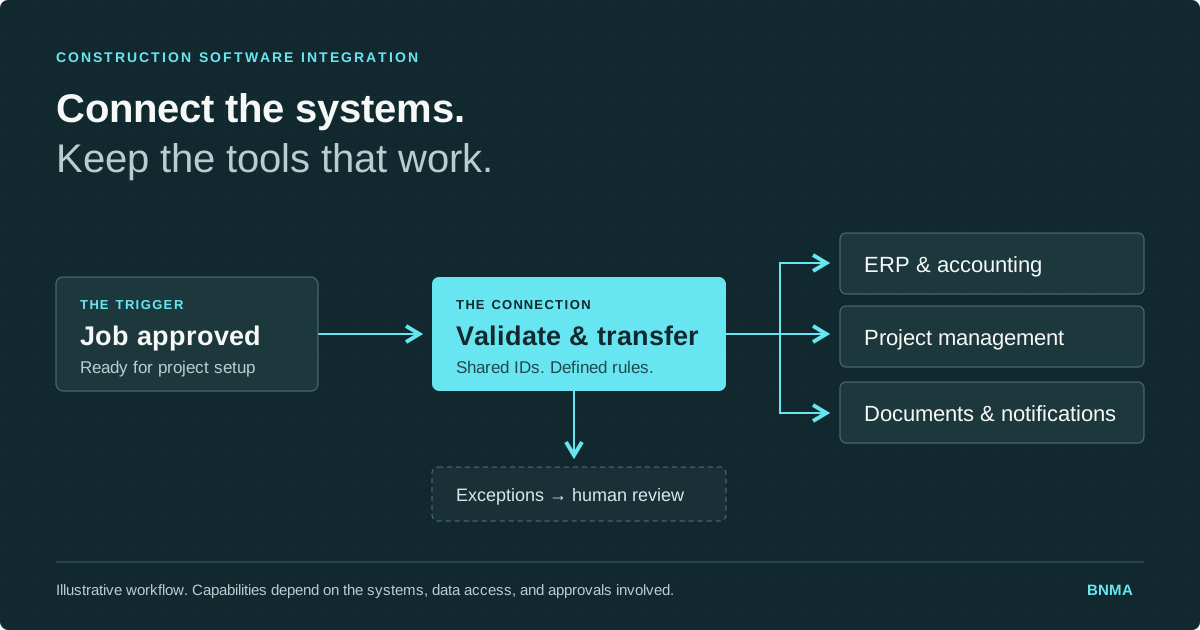
A better workflow starts when the job reaches an approved state. Required systems receive validated information, project structures are created, teams are notified, and exceptions go to an assigned person.
Not every step will be available for automation. Check APIs, data access, software editions, security requirements, and existing connectors first. Also define how to prevent duplicate jobs, record successful transfers, and retry failures. A partial setup should be visible, not mistaken for a completed handoff.
The hidden cost goes beyond administrative time
Disconnected workflows make it harder to trust what people see. A project manager may use one budget revision while accounting uses another. A report can be accurate when assembled and outdated when discussed.
The process also becomes dependent on whoever knows the spreadsheet, the export settings, and the unwritten exceptions. Onboarding is harder. Covering an absence is harder. Tracing who changed a value, or why a handoff stalled, becomes detective work.
The useful question is not just “How long does this take?” It is also “Which decisions are waiting for this information, and who notices when it is wrong?”
When is a spreadsheet a warning sign?
A spreadsheet becomes a warning sign when it runs a shared operational process without dependable ownership, access controls, or change history. Excel remains useful for analysis and flexible planning. The concern is a workbook that everyone depends on but few people understand, especially when its information is repeatedly copied from other systems.
- Multiple versions circulate, and nobody is certain which is current.
- One person understands the formulas and is afraid to change them.
- Teams repeatedly reconcile copied data before they can act.
- Leadership relies on it for decisions, but updates depend on reminders.
- Rows represent approvals, assignments, or handoffs rather than analysis.
Some workbooks should remain workbooks. Others need a reliable data feed. A shared approval process may need a small internal application with clear responsibilities and a record of changes.
Should a construction company replace its ERP?
An inefficient workflow is a reason to investigate, not proof that the ERP needs replacing. First determine whether the difficulty comes from missing connections, inaccessible data, weak reporting, or a process the ERP was never designed to handle. An integration or focused internal application may address the gap while preserving the core system.
Replacement can be appropriate when the platform no longer supports essential requirements, cannot be maintained securely, or makes necessary changes impractical. Compare that case against the cost and ongoing support of extending it.
In BNMA’s work with SSI, the engineering division of Lord & Sons, a custom project-management application worked alongside the existing ERP to support engineering workflows and improve project visibility. The solution addressed a specific operational gap.
What construction workflows can be automated?
Good candidates have a clear trigger, consistent information, known rules, and a defined owner for exceptions. Depending on the systems involved, construction workflow automation can connect job setup, reporting, equipment records, field submissions, and notifications. Start with a narrow workflow whose outcome you can verify.
- Estimate to project setup. Transfer approved job information and create the required project structure.
- Project health reporting. Bring schedule, financial, and field information together with visible refresh times.
- Equipment visibility. Connect equipment usage and job assignments so teams can review utilization consistently.
- Field-to-office workflows. Route structured field submissions to operations or accounting, keeping required approvals.
- Notifications. Alert an accountable person when an approval, missing record, or failed handoff needs attention.
- Forecasting. Combine actual costs, commitments, budgets, and project-manager projections while keeping their meanings distinct.
- Document processing. Route recurring documents and extract defined information for review where appropriate.
Where does AI fit into construction operations?
AI can assist with document search, summaries, information extraction, and questions about operational data. It is most useful when the information is accessible, permissions are respected, and someone can check the result. AI does not establish reliable connections or reconcile conflicting project records by itself.
A useful design might extract fields from an incoming document, validate them against the job record, and send uncertain values for review. If the task is simply copying an approved number between systems, a conventional integration may be sufficient.
How do you identify processes worth automating?
Listen for repeated descriptions of the same manual handoff: “I enter this in both systems,” “I export this into Excel,” or “Accounting doesn’t see it until someone emails it.” These are starting points for investigation. Follow one real item through the process and record the transfers, decisions, delays, and corrections.
Other useful signals include “We update this spreadsheet every Friday,” “Only one person knows how it works,” and “I check three systems to answer that.” Ask the employees doing the work to show you the steps.
For each candidate, record its frequency, time spent, number of handoffs, common errors, and downstream impact. Then check whether the data is accessible and the rules are stable. A frequent, well-understood process with clear ownership is usually a better first project than a sprawling workflow with unresolved exceptions.
Start with the workflow, then choose the technology
- Map the current process. Include the exports, emails, spreadsheets, and workarounds.
- Find where information originates. Identify who creates it and who approves it.
- Mark every re-entry point. Separate copying from decisions and corrections.
- Choose the authoritative record. Define which system owns each important field.
- Keep human decisions explicit. Name the person responsible for approvals and exceptions.
- Connect the repetitive steps. Test validation, permissions, retries, and failure notifications.
- Measure the result. Compare handoff time, corrections, report freshness, and manual touches.
Assign an owner for maintaining the connection when systems or business rules change. Successful automation is an operating process that people can trust and support.
Questions construction teams ask
Frequently asked questions
Why do construction companies still use spreadsheets?
Spreadsheets are flexible places to combine information, model scenarios, and fill reporting gaps. They become harder to manage when teams use them to run shared approvals, track operational status, or reconcile repeated exports. Keep them where flexibility helps. Consider integration or a focused application when the workbook is carrying an ongoing business process.
Can Procore, ERP, accounting, and field systems share data?
They may be able to share selected data through supported APIs, existing connectors, or controlled file transfers. The answer depends on the exact products, versions, permissions, and records involved. Check what can be read and written, how project identifiers match, and how failures are handled before promising a complete connection between platforms.
Do we need to replace our ERP to automate workflows?
Not necessarily. If the ERP still handles its core responsibilities well, connecting it to other tools or adding a small application may solve the workflow problem. Replacement deserves consideration when essential requirements, security, or maintainability cannot reasonably be addressed. Compare both approaches against the specific process and the cost of keeping it working.
What construction processes are easiest to automate first?
Start with repetitive processes that use consistent data and clear rules, such as transferring approved project details, assembling recurring reports, or notifying an owner when a record needs attention. Ease still depends on system access and exceptions. Choose a narrow process you understand, retain necessary approvals, and test it with real examples.
Where can AI help a construction company?
AI can help people search project documents, summarize material, extract information, or ask questions about operational records. These uses need appropriate access controls and a way to check answers against their sources. Establish reliable data and workflows first, then evaluate whether AI adds useful interpretation beyond what a conventional integration already provides.
When should a construction company build custom software?
Consider custom software when a recurring, important workflow is not served well by existing tools, configuration, or available integrations. A focused application may support forecasting, approvals, or project visibility without replacing core systems. Define the users, data ownership, expected improvement, maintenance responsibility, and ongoing cost before deciding that a custom build is worthwhile.
Make the software you own work better together
Your next operational improvement may be in the spaces between the systems you already use. Fixing one recurring handoff can give your team a more dependable process and a clearer view of the business.
BNMA helps construction companies connect existing systems, automate manual workflows, and build focused tools where standard software falls short. If spreadsheets, exports, or email are holding a process together, we can help identify the gaps and which ones are worth fixing.
Talk through your workflow